Linux原生星露谷联机卡“正在连接服务器” 临时解决方案
在孤独地种田了好久以后。。。昨天终于有人和我一起联机玩星露谷了(开心)
然后不出意外的话就出意外了😇
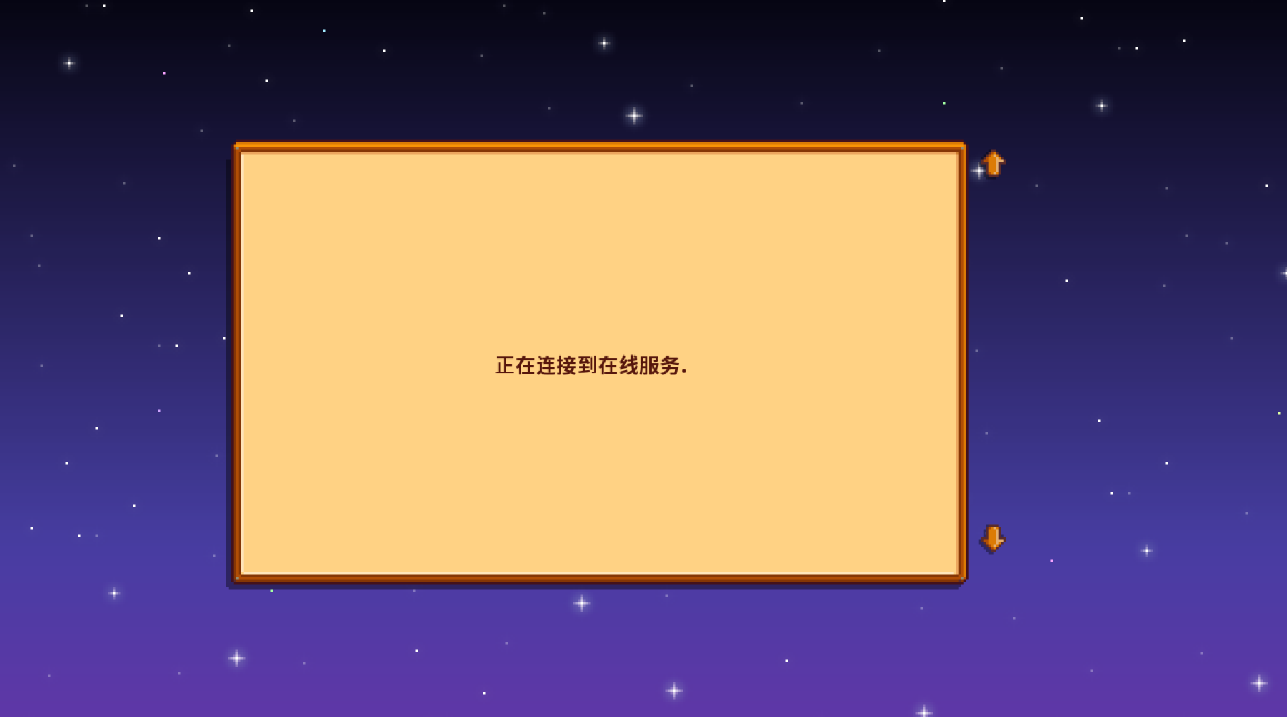
如果我使用Linux的原生版本星露谷,会一直卡在“正在连接到在线服务”。但是如果使用Proton兼容层,我之前安装的一些实用性Mod就没法加载了(我真的很需要小地图)
🤔获取日志
俗话说的好,如果一个东西有问题说明这个东西有问题。而一个软件出问题,最好能找到这个问题的日志!
没有日志的Debug就是蒙着眼睛走路!
首先先进入星露谷的安装文件夹 ~/.local/share/Steam/steamapps/common/Stardew Valley 并打开终端。
运行命令,创建log文件并将SMAPI的输出定向到log文件。
~/.local/share/Steam/steamapps/common/Stardew Valley at 11:29:47
❯ touch SMAPI.log
~/.local/share/Steam/steamapps/common/Stardew Valley at 11:32:54
❯ ./StardewModdingAPI >> SMAPI.log
[S_API] SteamAPI_Init(): Loaded '/home/yu/.local/share/Steam/linux64/steamclient.so' OK.
Setting breakpad minidump AppID = 480
SteamInternal_SetMinidumpSteamID: Caching Steam ID: 76561198365104241 [API loaded no]
接下来就成功获得了错误日志😈😈😈
❯ cat SMAPI.log
[game] Error initializing the Galaxy API.
TypeInitializationException: The type initializer for 'Galaxy.Api.GalaxyInstancePINVOKE' threw an exception.
 ---> TypeInitializationException: The type initializer for 'SWIGExceptionHelper' threw an exception.
 ---> DllNotFoundException: Unable to load shared library 'GalaxyCSharpGlue' or one of its dependencies. In order to help diagnose loading problems, consider setting the LD_DEBUG environment variable: libGalaxyCSharpGlue: cannot open shared object file: No such file or directory
   at Galaxy.Api.GalaxyInstancePINVOKE.SWIGExceptionHelper.SWIGRegisterExceptionCallbacks_GalaxyInstance(ExceptionDelegate applicationDelegate, ExceptionDelegate arithmeticDelegate, ExceptionDelegate divideByZeroDelegate, ExceptionDelegate indexOutOfRangeDelegate, ExceptionDelegate invalidCastDelegate, ExceptionDelegate invalidOperationDelegate, ExceptionDelegate ioDelegate, ExceptionDelegate nullReferenceDelegate, ExceptionDelegate outOfMemoryDelegate, ExceptionDelegate overflowDelegate, ExceptionDelegate systemExceptionDelegate)
   at Galaxy.Api.GalaxyInstancePINVOKE.SWIGExceptionHelper..cctor()
   --- End of inner exception stack trace ---
   at Galaxy.Api.GalaxyInstancePINVOKE.SWIGExceptionHelper..ctor()
   at Galaxy.Api.GalaxyInstancePINVOKE..cctor()
   --- End of inner exception stack trace ---
   at Galaxy.Api.GalaxyInstancePINVOKE.new_InitParams__SWIG_3(String jarg1, String jarg2, String jarg3)
   at StardewValley.SDKs.Steam.SteamHelper.Initialize() in D:\GitlabRunner\builds\Gq5qA5P4\1\ConcernedApe\stardewvalley\Farmer\Farmer\SDKs\Steam\SteamHelper.cs:line 90
[SMAPI] Type 'help' for help, or 'help <cmd>' for a command's usage
[game] Galaxy SignInSteam failed with an exception:
TypeInitializationException: The type initializer for 'Galaxy.Api.GalaxyInstance' threw an exception.
 ---> TypeInitializationException: The type initializer for 'CustomExceptionHelper' threw an exception.
 ---> DllNotFoundException: Unable to load shared library 'GalaxyCSharpGlue' or one of its dependencies. In order to help diagnose loading problems, consider setting the LD_DEBUG environment variable: libGalaxyCSharpGlue: cannot open shared object file: No such file or directory
   at Galaxy.Api.GalaxyInstance.CustomExceptionHelper.CustomExceptionRegisterCallback(CustomExceptionDelegate customCallback)
   at Galaxy.Api.GalaxyInstance.CustomExceptionHelper..cctor()
   --- End of inner exception stack trace ---
   at Galaxy.Api.GalaxyInstance.CustomExceptionHelper..ctor()
   at Galaxy.Api.GalaxyInstance..cctor()
   --- End of inner exception stack trace ---
   at Galaxy.Api.GalaxyInstance.User()
   at StardewValley.SDKs.Steam.SteamHelper.onEncryptedAppTicketResponse(EncryptedAppTicketResponse_t response, Boolean ioFailure) in D:\GitlabRunner\builds\Gq5qA5P4\1\ConcernedApe\stardewvalley\Farmer\Farmer\SDKs\Steam\SteamHelper.cs:line 251
IPC function call IClientUtils::GetSteamEnvironmentForApp took too long: 98 msec
可以定位到错误的原因是无法初始化Galaxy API,问题出在 libGalaxyCSharpGlue。
搜索问题
搜索关键词:GalaxyAPI libGalaxyCSharpGlue 等
得到了类似的结果!
glibc 在 2.41 版本引入的兼容性变化,导致 GOG Galaxy API 库(libGalaxy64.so 和 libGalaxyCSharpGlue.so)加载失败。具体原因是新版本对 GNU_STACK 段进行了更严格的检查。(挠头)
继续找解决方案!
首先排除最危险的解决方法:降级glibc
然后我搜索到了一个工具:patchelf
和一个同样遇到这个问题的博主。。。
彳亍,原来是我绕了个大弯子🤡🤡🤡
最终解决
安装 patchelf并修复GOG GALAXY API库相关文件。
# 安装patchelf
paru -S patchelf

# 转到安装目录
cd "~/.local/share/Steam/steamapps/common/Stardew Valley"

# 修补文件
cp libGalaxy64.so libGalaxy64.so.bak
cp libGalaxyCSharpGlue.so libGalaxyCSharpGlue.so.bak
patchelf --clear-execstack libGalaxy64.so
patchelf --clear-execstack libGalaxyCSharpGlue.so
问题完美解决!!!